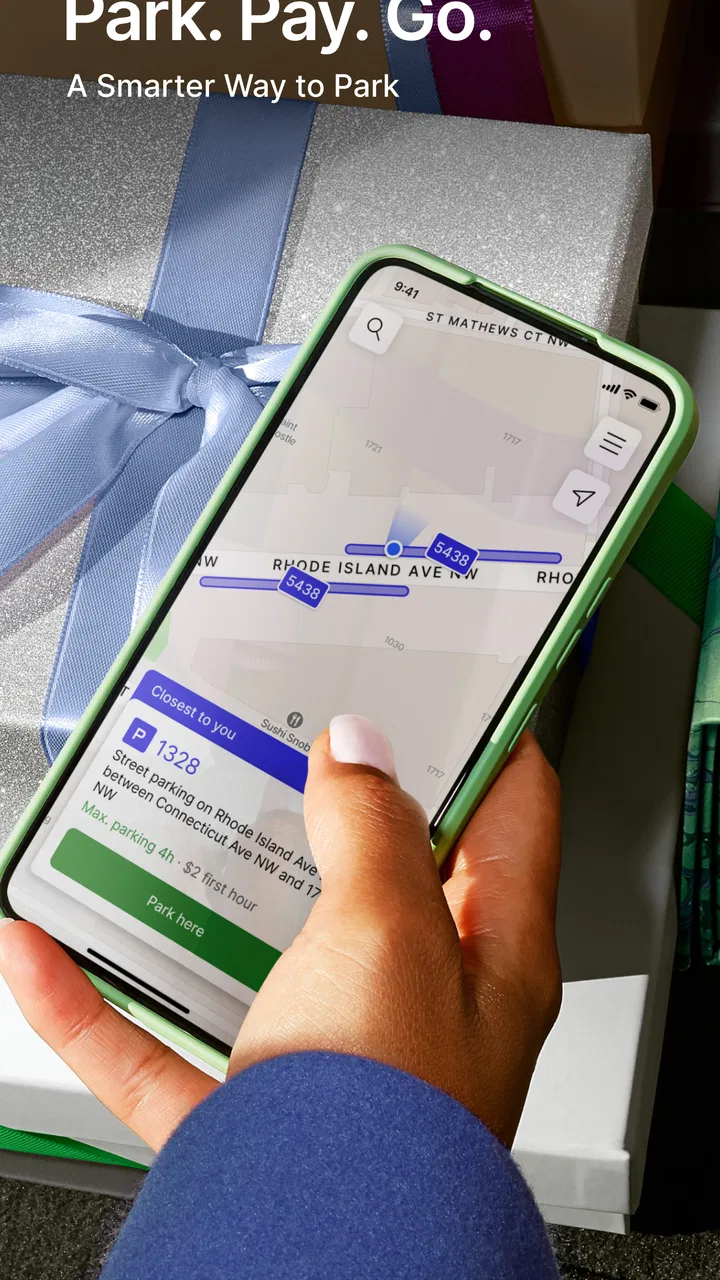
ParkMobile: Park. Pay. Go.
- 4.3
- Rating
- 10.00M
- Installs
- Free
- Price

 Analysis by App-foxy
Parking apps are easiest to appreciate when you are already late, carrying bags, or circling an unfamiliar downtown block. I tested ParkMobile: Park. Pay. Go. as a practical Auto & Vehicles app, and my overall impression is that it is most useful when your main problem is not finding a car park in general, but turning a known parking option into a simpler, more organized stop. The promise is straightforward: locate a participating space, pay through the phone, and reserve ahead when that option is available.
That sounds modest, but it changes the way I approach parking. Instead of treating the meter, payment machine, and reservation process as separate tasks, I can begin with the app and decide whether a digital payment or advance booking makes sense. ParkMobile, LLC has developed the app for a broad audience, and its long presence is reflected in its release history: it first appeared on November 28, 2011. It is free to install, rated for Everyone, and available on Android devices running version 6.0 or later.
My recommendation depends on your habits. If you regularly park in cities, at venues, or in busy areas where participating locations are available, this is a convenient tool to keep ready. If you usually park in private garages with their own systems, or if you expect every street space to appear in one universal map, the experience may feel less useful. The important decision is not whether a parking app sounds helpful; it is whether ParkMobile fits the places where you actually leave your car.
You May Also Like

 Blood Strike: 2.5 Anniversary
Blood Strike’s Loadouts Turn Every Drop Into a Tactical Gamble
A close look at Blood Strike’s custom loadouts: how fast access to signature weapons reshapes its battle royale rhythm, rewards preparation, and narrows the gap between fights.

 Pandora - Music & Podcasts
Pandora’s Music Is Easy to Start, but Harder to Recover
Pandora’s strength is its low-effort path from a seed to a station. Its weak spot is how much confidence it asks you to place in connection, setup, and quiet recovery.

 8 Ball Pool
8 Ball Pool Is Built on Rivalries, Rematches, and Routine
A close look at the rivalries, rematches, shared routines, and unanswered safety questions that turn a quick pool match into a persistent mobile community.

 Samsung Music
Samsung Music’s Quiet Strength Is Playing What You Already Own
Its reach comes less from spectacle than from dependable access to a personal library. That simplicity is both the app’s strongest retention engine and its ceiling.

 AccuWeather: Weather Radar
AccuWeather Review: A Quick, Clear Forecast for Everyday Decisions
For everyday plans, the best forecast is the one you can understand quickly. AccuWeather makes rain timing, radar, and local conditions easy to act on, with a few trade-offs.

 Hill Climb Racing
Why Hill Climb Racing Still Turns Crashes Into One More Run
A tiny car, a bumpy hill and one more upgrade: Hill Climb Racing keeps resurfacing because its simple chaos makes every near-miss feel personal.
More From Our News Desk
View All News


What I considered before recommending it
I weigh ParkMobile by the problems it solves after the first convenient session: whether I can use it at places I return to, whether checking it becomes a useful habit, and whether the extra phone step stays worthwhile. Those questions matter more than a quick first impression, because parking routines are local and often repetitive. With that in mind, I look next at the situations where the app can become a dependable part of a regular trip.
The first question is coverage, not interface
The most important test is whether the app supports the parking locations you use. A polished screen cannot help if your preferred garage, municipal lot, or street zone is not part of the available network. I would install it before a trip, search around the destination, and check the result while I still have time to change plans. That small habit prevents the most frustrating mistake: arriving at a busy location and discovering that the digital option you expected is not available there.
This is also why I would not treat ParkMobile as a replacement for every parking method. It is a digital layer for participating parking locations, not a guarantee that every curb, garage, or event area can be handled in the same way. I still look at the signs at the space itself. The app can make payment or reservation more convenient, but the posted rules remain the final authority for restrictions, time limits, and permitted parking.
Decide whether you need payment or planning
I see two different reasons to use the app. The first is immediate convenience: I have arrived, I am allowed to park, and I want to handle payment from my phone rather than search for coins or stand at a machine. The second is advance planning: I know where I am going and want to reserve a spot ahead of time when the location offers that choice. Those uses overlap, but they solve different problems.
For a short, spontaneous stop, a reservation workflow may be unnecessary. For a concert, appointment, or crowded city visit, planning ahead can be more valuable than saving a few moments at the curb. I would choose the app based on the uncertainty of the trip. When the destination is predictable and parking demand is high, advance preparation is the stronger reason to use it. When the destination is flexible, I would use the app as a search and payment aid rather than committing too early.
Think about the full parking task
Parking is not only the moment when money changes hands. I need to identify the right location, understand whether I am in the correct zone, select an appropriate duration, and remember when the session ends. A useful parking app should reduce mistakes across that whole chain. ParkMobile is appealing because it brings those steps into one phone-based workflow instead of leaving me to combine a map, a meter, and a separate reservation service.
Still, convenience can create overconfidence. I would double-check the zone or location before confirming, especially when several lots are close together. A payment made for the wrong area is not made useful merely because it was quick. My practical rule is simple: compare the app’s location details with the sign beside the car before I tap through the final step.
What the adoption figures suggest
The app has an average rating of 4.4 from around 83 thousand ratings, with about 25 thousand written reviews and over 10 million installs. Those figures do not tell me that every parking session will be smooth, but they do suggest that ParkMobile has become a familiar option for many drivers rather than a niche experiment. I interpret that as a reason to try it, not as a reason to stop checking local availability and parking instructions.
The current version is 25.48.3, which matters mainly because parking tools need regular maintenance to remain dependable across changing devices and locations. I would keep the app updated before relying on it for an important trip. It is free to download, making the initial decision easy, although the real cost of any parking session still depends on the location and the terms shown during use.
My realistic everyday test
Imagine I am meeting a friend downtown after work. I know the restaurant, but I do not know whether the nearby street spaces will be free. Before leaving, I search the destination in ParkMobile and look for participating options. If an advance reservation is available and the meeting time is fixed, I can decide whether the added certainty is worth choosing that option. If not, I can arrive, compare the available location with the street signs, and use the app for the eligible space.
That workflow is more useful than simply opening the app after I have already parked. It gives me a backup plan before the stressful part of the journey. I can also avoid making the common mistake of choosing the first result without checking walking distance or the location identity. For me, the strongest habit is to use ParkMobile as a parking decision tool before the trip, then as a payment tool once I am on site.
Where ParkMobile earns its place
For me, ParkMobile earns space on a phone when it helps with recurring uncertainty rather than merely replacing a familiar payment machine. I would keep it ready for destinations where checking ahead or paying digitally saves a meaningful detour, while letting local signs and other options guide the final choice. The next section considers how that balance holds up beyond the first few uses.
It combines two useful moments in one service
The app’s biggest strength is the connection between finding a place and handling the transaction. Traditional parking often forces me to discover a space physically, interpret a sign, pay through whatever machine is provided, and remember the details afterward. ParkMobile can simplify that sequence when the location participates. The benefit is not flashy; it is the reduction of small interruptions when I am already focused on getting somewhere.
The reservation side is particularly useful for trips where arriving without a plan would be risky. I would consider it for a fixed appointment, a busy venue, or a visit where being late has a bigger cost than spending a few minutes planning. I would not reserve automatically for every outing. The value comes from matching the tool to the uncertainty of parking at the destination.
It suits drivers who dislike parking machines
I prefer phone payment when I am carrying luggage, dealing with poor weather, or trying to keep a group moving. I also like having the parking process attached to the same device I use for navigation and my calendar. That does not make every transaction effortless, but it can remove the awkward pause of finding a machine, waiting beside it, and returning to the car with a receipt or confirmation.
This is a good fit for people who make frequent urban trips and want one familiar workflow. It is also helpful for occasional visitors who would rather prepare before entering an unfamiliar parking area. The app is free and carries an Everyone content rating, so there is no unusual age barrier to installing it for a household member who needs a simpler way to manage parking.
The app can improve preparation, not just payment
A less obvious advantage is that searching before departure changes my parking choices. I can compare participating locations near the destination instead of accepting the first open-looking space. That can help me decide whether a longer walk is worthwhile, whether a reservation makes sense, or whether I should choose a different destination entrance. The app becomes more valuable when I use it to reduce uncertainty before driving, rather than treating it as a digital coin slot.
I also find it useful to separate the parking decision from the navigation decision. A map may show where a destination is, but that does not necessarily tell me which parking option is practical. I can use ParkMobile to identify a possible place, then judge the walk and arrival route independently. This avoids assuming that the closest result is automatically the best one.
It has the credibility of an established product
ParkMobile, LLC is not presenting a brand-new parking concept. The app has been available since late 2011, and its current release shows that the product continues to be maintained. That history matters to me because parking is a trust-heavy task. I want an app that feels like a service I can learn once and reuse, not a temporary tool I install for one trip and immediately abandon.
Of course, longevity does not solve every local problem. A long-running app can still depend on the accuracy of location information and the participation of individual parking operators. I see its established presence as a practical reason to include it in my travel routine, while still verifying the signs and the exact space before payment.
Small habits that make it more dependable
- Search before driving when the destination is busy, rather than waiting until the car is parked.
- Match the location shown in the app with the physical sign, especially when several lots or zones sit close together.
- Use advance reservation selectively for fixed plans, not as an automatic step for every casual stop.
- Keep the app updated and make sure the phone has enough battery for the entire trip.
- Save the confirmation or note the session details in the way that works best for you, particularly when your return time is uncertain.
These habits are not glamorous, but they address the real failure points in mobile parking: choosing the wrong location, planning too late, or depending on a phone that is nearly out of power. The app can streamline the process; it cannot replace attention at the curb.
Where the experience may still feel imperfect
The first friction is dependence on participation. If the place I want does not support ParkMobile, I still need the local meter, garage machine, or another method. That means I cannot rely on it as my only parking plan in an unfamiliar city. I would keep a payment alternative available, especially for a long drive or an important appointment.
The second issue is that digital convenience can hide the need to read local instructions. A nearby result may look correct while belonging to a different zone or facility. I consider this a user-interface limitation as much as a user habit: parking environments are visually crowded, and no app can remove every ambiguity from signs, entrances, and boundaries.
The third trade-off is planning commitment. Reserving ahead can reduce uncertainty, but it may be less attractive when my schedule is fluid. If I am not sure when I will arrive or whether the meeting will happen, I would rather keep the trip flexible and decide at the location. The right choice depends on whether certainty or freedom matters more that day.
When another category of tool may be better
For private garage users, a garage-specific app may be more direct if the facility already has its own system. In that case, using the operator’s tool can make sense because it is built around that one property rather than a wider parking network. I would also prefer a local transportation or city parking resource when my main need is understanding municipal rules rather than paying for a participating space.
Navigation apps may be better when I only need directions and do not want to manage parking digitally. A general map can help me compare the destination, walking route, and surrounding streets, while ParkMobile is more useful when I have identified a participating parking option and want to handle the parking transaction. These tools are not necessarily competitors; they can serve different stages of the same trip.
Drivers who rarely park away from home may not gain enough from installing another app. If my routine is a driveway, a workplace lot with a fixed process, and familiar local errands, ParkMobile may sit unused. I would recommend it more strongly to people whose parking situations change from trip to trip.
The cost of switching from traditional parking
Moving from a meter or garage machine to ParkMobile is not difficult, but it does add a new routine. I need to search for the destination, recognize the correct location, complete the digital payment process, and remember to check the session details. The free download lowers the barrier, yet the mental cost is still real: I am replacing a visible machine with a phone workflow that requires careful confirmation.
For a first use, I would not wait until the final minute. Install the app at home, explore the destination, and make sure I understand the screen before arriving. That is especially important for anyone uncomfortable with mobile payments or for a driver who may have limited signal in a garage. A few minutes of preparation can prevent the feeling that the app is slowing me down when I need it most.
I would also avoid switching blindly during a time-sensitive trip. If the meter is clear, nearby, and easy to use, the traditional method may be faster. ParkMobile becomes worthwhile when it offers a specific advantage: advance planning, phone-based payment, or a simpler way to manage a location that would otherwise be inconvenient. Convenience should be measured against the actual parking situation, not assumed because the app is modern.
Questions I would answer before installing
If you are wondering whether it works everywhere, the practical answer is to search your regular destinations first. ParkMobile is designed around participating locations, so availability is local. Check before you depend on it, and keep reading the signs once you arrive.
If you are asking whether it is only for reservations, it is more flexible than that. Its role can include finding a parking option, paying for an eligible session, and reserving ahead where that choice is offered. I would use whichever part solves the problem in front of me instead of assuming every visit needs a reservation.
If you are concerned about age suitability, the app is rated Everyone. If you are wondering about device compatibility, the listed minimum is Android 6.0, which covers a wide range of Android phones, although I would still keep the operating system and app current for the smoothest experience.
If you want to know whether it is truly free, the app itself is free to download. That should not be confused with free parking. Any parking charge, reservation condition, or local requirement still belongs to the location and should be reviewed before confirmation.
If you are deciding whether to use it for an important event, my answer is yes, but only after checking the destination in advance. I would not arrive at the event and assume the first nearby result guarantees a suitable space. Preparation is what turns the app from a last-minute experiment into a dependable part of the trip.
My recommendation by driver type
- Frequent city driver
- I recommend trying it first. The combination of location search, digital payment, and advance planning can remove repeated parking friction.
- Occasional visitor
- Install it before a busy trip and search the destination early. It is most valuable as a backup plan when parking uncertainty is high.
- Private-garage regular
- Compare it with the garage operator’s own process. A dedicated alternative may be simpler if you always use the same facility.
- Flexible, spontaneous driver
- Use it selectively. Reservations may not suit changing plans, while location-based payment can still be useful when the participating space is clear.
- Driver with an older Android phone
- Check that the device meets the Android 6.0 minimum and avoid relying on the app for the first time during a rushed journey.
My final view
I recommend ParkMobile: Park. Pay. Go. to drivers who regularly deal with participating urban parking locations and want more control before they leave home. Its strongest quality is not that it makes parking magically available; it is that it brings planning and payment into a single, familiar phone-based process. For me, that is enough to justify keeping it installed, especially for busy destinations and fixed appointments.
I would not call it an essential app for everyone. People with predictable private parking, drivers who prefer machines, and anyone whose usual destinations are not supported may be better served by their existing methods. Even for regular users, I would treat the app as an aid rather than a substitute for checking signs, confirming the correct location, and carrying a backup plan.
After weighing the alternatives, my decision is clear: choose ParkMobile when parking uncertainty is the problem you want to solve. Search ahead for important trips, use reservations only when they genuinely add value, and verify the physical location before paying. Used that way, this free Auto & Vehicles app feels practical rather than overcomplicated, and its established history, broad adoption, and 4.4 average make it a sensible first option for many Android drivers.
FAQs for ParkMobile: Park. Pay. Go.
01How does ParkMobile work for locating available parking spots?
ParkMobile uses GPS technology to help users find available parking spots nearby. Once you open the app, it shows a map with real-time availability of spaces. You can filter by type, such as street parking or garages, making it easy to find a spot that suits your needs.
02Is ParkMobile available in my city?
ParkMobile is available in many cities across the United States. To check if it's operational in your area, visit the app's official website or open the app and enter your location. The app continuously expands its reach, so even if it's not currently available, it may be soon.
03What payment methods does ParkMobile accept?
ParkMobile accepts various payment methods, including credit and debit cards. You can securely save your payment details within the app for quick transactions. Some locations also support additional payment options like PayPal or Apple Pay, depending on local arrangements.
04Are there any additional fees for using ParkMobile?
While ParkMobile itself is free to download, there may be convenience fees applied per transaction. These fees vary depending on the city and parking operator. It's advisable to check the fee details within the app before confirming your parking session to avoid surprises.
05Can I extend my parking session through the app?
Yes, ParkMobile allows you to extend your parking session remotely, as long as local parking rules permit it. Simply open the app, navigate to your active session, and select the option to extend time. This feature is particularly useful if your plans change unexpectedly.
Pros
- User-friendly interface
- easy navigation.
- Wide availability in multiple cities.
- Secure payment options integrated.
- Real-time parking availability updates.
- Saves time with digital parking transactions.
Cons
- Limited offline functionality.
- Occasional app crashes reported.
- Not all parking areas are listed.
- Service fees apply for transactions.
- Requires location access for full use.

ParkMobile: Park. Pay. Go.
Gallery